Discord



'/%3e%3c/g%3e%3cdefs%3e%3clinearGradient%20id='paint0_linear_91_7909'%20x1='2.80579'%20y1='2.93848'%20x2='14.3838'%20y2='4.55824'%20gradientUnits='userSpaceOnUse'%3e%3cstop%20stop-color='%231198B9'/%3e%3cstop%20offset='0.0001'%20stop-color='%230F9DB8'/%3e%3cstop%20offset='1'%20stop-color='%232468C0'/%3e%3c/linearGradient%3e%3c/defs%3e%3c/svg%3e)
'/%3e%3c/g%3e%3cdefs%3e%3clinearGradient%20id='paint0_linear_91_7889'%20x1='4.20874'%20y1='4.40771'%20x2='21.5757'%20y2='6.83736'%20gradientUnits='userSpaceOnUse'%3e%3cstop%20stop-color='%231198B9'/%3e%3cstop%20offset='0.0001'%20stop-color='%230F9DB8'/%3e%3cstop%20offset='1'%20stop-color='%232468C0'/%3e%3c/linearGradient%3e%3c/defs%3e%3c/svg%3e)

















Hourly billing is the single most misrepresented feature in VPS hosting. Almost every provider on this list advertises it. Very few of them mean the same thing by it, and at least one bills you for a server that is switched off.
The differences are worth real money. A build agent that runs three hours a day costs you an eighth of a monthly plan on a provider that bills honestly by the hour, and exactly the same as a monthly plan on a provider whose "hourly" rate is just the monthly price divided by 730 with no way to stop it. This article ranks ten providers on how their hourly billing actually behaves, not on how it is marketed.
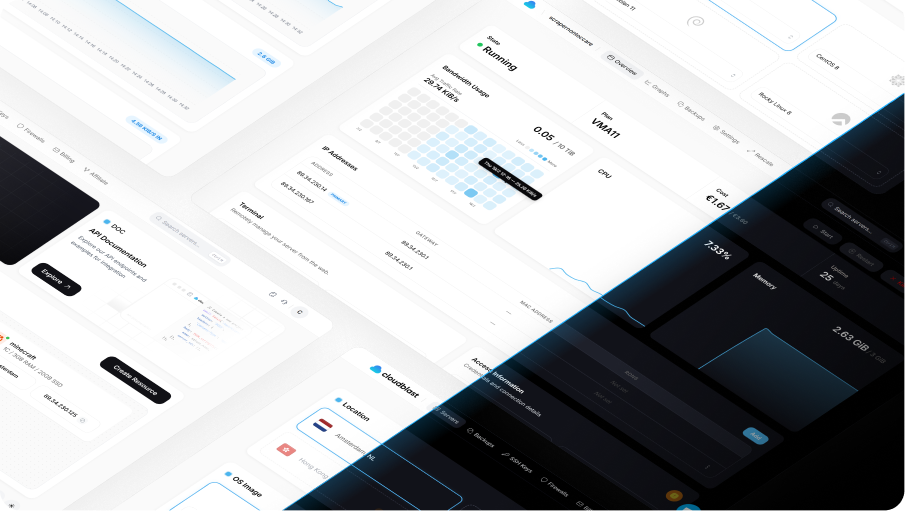
We are CloudBlast and we are first on this list. Our entry plan is €0.0049/h, billing stops when the server is destroyed, and there is no minimum term. The rest of the article explains what everyone else does and where they beat us.
What "Hourly Billing" Actually Means
Four questions separate real hourly billing from the marketing version. Ask all four before you trust a rate.
What is the billing increment? Per-hour is standard. Per-second (DigitalOcean) and five-minute cycles (CloudSigma) are finer. An increment matters most for very short-lived instances: at per-hour granularity, a 90-second job costs a full hour.
Does stopping the server stop the bill? This is the big one. On most providers a stopped instance still reserves its disk and IP, so you keep paying. Kamatera stops charging when the server is powered off. AWS Lightsail charges the full rate whether the instance is running or stopped, and only deletion ends it. Everyone else sits somewhere between.
Is there a monthly cap? Vultr caps at 672 hours, so a 31-day month costs the same as 28 days. Hetzner, Akamai and Lightsail cap at the monthly plan price. A cap is in your favour, and its absence means a full month at an hourly rate can cost more than the advertised monthly price.
What else bills separately? The compute rate is rarely the whole bill. Scaleway charges hourly for flexible IPs and snapshots on top of the instance. Egress, block storage, backups and extra IPv4 addresses all have their own meters on most platforms.
Quick Comparison
Entry-tier rates as of August 2026. "Stop = free" means powering the instance down ends compute charges.
| Provider | Increment | Entry rate | Monthly cap | Stop = free |
|---|---|---|---|---|
| CloudBlast | Per hour | €0.0049/h | Yes, at €3.60 | No, destroy to end billing |
| DigitalOcean | Per second, 60s min | about $0.009/h | Yes, at $6 | No |
| Hetzner Cloud | Per hour | €0.0088/h | Yes | No |
| Vultr | Per hour | about $0.004/h | Yes, 672 hours | No |
| UpCloud | Per hour | from about €0.004/h | Yes | No |
| Scaleway | Per hour | from about €0.01/h | Varies by type | No, IP bills separately |
| Kamatera | Per hour | from about $0.005/h | No | Yes |
| Akamai (Linode) | Per hour | about $0.0075/h | Yes, at $5 | No |
| CloudSigma | Five minutes | from about $0.05/h | No | Partially |
| AWS Lightsail | Per hour | $0.0067/h | Yes, at $5 | No, stopped instances still bill |
1. CloudBlast
Best for: anyone who wants the lowest honest hourly rate on real AMD EPYC hardware, with no monthly minimum and no surprise meters.
Entry rate: €0.0049/h (VMA11, 1 AMD EPYC core, 3 GB RAM, 20 GB NVMe), capped at €3.60/mo.
Hourly billing is not a tier or an upgrade here, it applies to all eight plans. The rate scales linearly with the plan: €0.0067/h for the VMA21 (2 cores, 4 GB), €0.014/h for the VMA41 (4 cores, 8 GB), €0.109/h for the VMA81 (16 cores, 64 GB). Run any of them for a full month and you pay the monthly price, never more.
Where this pays off is the arithmetic on short-lived infrastructure. A VMA21 running eight hours a day for a month is roughly €1.60 instead of €4.80. A load-test rig of ten VMA51s for four hours is about €1.08 in total. There is no minimum term, no setup fee and no prepay requirement.
The add-ons keep the same model rather than switching to monthly, which is where a lot of hourly pricing quietly falls apart. Additional IPv4 is €2.50/mo or €0.00347/h. Backups are €0.09/GB and block storage €0.15/GB. Traffic is unmetered in Amsterdam and Salt Lake City on a 10 Gbps port, so the one meter that usually ruins a bill does not exist in two of our three regions.
Being straight about the limitation: billing runs while the instance exists, not only while it is running. Powering a server off does not stop the charge, because the disk and IP stay reserved for you. To stop paying, destroy it. Kamatera is the only provider here that does better on this specific point.
What we like: lowest entry rate on this list, same hourly model across every plan and most add-ons, unmetered 10 Gbps, no minimum term, API and MCP server for scripted teardown.
What to watch: three locations. Stopped instances still bill. No managed services.
2. DigitalOcean
Best for: the finest billing granularity on the list, and the platform services around it.
DigitalOcean switched Droplets to per-second billing on 1 January 2026, with a minimum charge of 60 seconds or $0.01, whichever is higher. Nobody else here bills that finely. If your workload is a swarm of instances that live for two or three minutes at a time, this is the correct answer and the rest of the list is not close.
The catch is the underlying price. The $6 Droplet is 1 GB of RAM, and the 2 vCPU / 4 GB configuration most people actually deploy is $24/mo. You are paying roughly 4x the CloudBlast rate for the same shape of machine, and buying the ecosystem with it: managed Postgres, Spaces, App Platform, and pooled bandwidth across the account.
Stopping a Droplet does not stop billing. You pay until it is destroyed.
What we like: per-second billing with a 60-second floor, pooled transfer allowance, the best documentation in the industry, mature managed services.
What to watch: the highest price per core here for a mainstream provider. Egress overage at $0.01/GiB. Powered-off Droplets still bill.
3. Hetzner Cloud
Best for: hourly billing with the best API and tooling in European hosting, if the 2026 prices still work for you.
Hetzner has billed hourly with a monthly cap for years and the implementation is clean. The API, CLI and Terraform provider make programmatic create-and-destroy genuinely pleasant, which is the entire point of hourly billing.
What changed is the number. The 15 June 2026 price adjustment raised CX and CAX plans roughly 1.3x to 1.4x and the AMD CPX and dedicated CCX lines by 2.1x to 3.1x depending on line and region. The CX23 now runs €0.0088/h (€5.49/mo) and the CPX22 went from €0.0128/h to €0.0312/h. On tooling Hetzner is still ahead of most of this list. On price per hour it no longer leads.
What we like: best-in-class API and Terraform support, 20 TB included traffic on EU instances, reliable monthly cap, mature private networking.
What to watch: the June 2026 increase, particularly on CPX and CCX. EU and US regions only. Signup verification can delay your first deploy.
4. Vultr
Best for: hourly billing in a specific city, with a monthly cap that is slightly better than everyone else's.
Vultr bills hourly on every Cloud Compute plan except VX1, capped at 672 hours a month. That cap is worth noting: a 31-day month has 744 hours, so you get roughly three days free compared to strict hourly billing. It is a small structural discount that nobody advertises loudly.
The tiering matters more than the rate. Regular Performance starts at $2.50/mo on shared Intel cores with SATA SSDs, which is not a serious 2026 product. High Performance and High Frequency start around $6/mo and put you on AMD EPYC or 3 GHz+ Xeon with NVMe. Compare the right tier or the comparison is meaningless.
What we like: over thirty locations, 672-hour cap, bare metal and GPU billed the same way in the same panel.
What to watch: the Regular Performance tier flatters the headline price. Small bandwidth allowances on cheap plans, with billed overage.
5. UpCloud
Best for: hourly billing where disk throughput is the bottleneck.
UpCloud has been hourly-billed since it started, across twelve data centres including Amsterdam, Frankfurt, Helsinki, London, Madrid, Warsaw, Singapore and Sydney. Pricing is quoted in euros with a readable structure, and small Developer plans start around €3/mo with the hourly equivalent available.
The differentiator is MaxIOPS, their storage backend, which consistently benchmarks near the top of the field for disk performance. If your hourly workload is database restores, index rebuilds or anything else that is I/O bound rather than CPU bound, the higher rate can be the cheaper option in wall-clock terms.
What we like: hourly from day one, genuinely fast storage, clean euro pricing, good API, strong European footprint.
What to watch: more expensive per core than the value end of this list. Smaller service catalogue than the hyperscalers.
6. Scaleway
Best for: teams who want everything metered hourly, including the parts other providers bundle.
Scaleway applies per-hour billing consistently across the whole stack. Instances bill hourly, flexible IPs bill at €0.004/h, snapshots bill per GB per hour. For ephemeral infrastructure that is exactly right, because you stop paying for the IP and the snapshot as well as the compute.
It is also the reason Scaleway is hard to forecast. The compute line is a fraction of the bill and the total depends on how many satellite resources you left attached. Destroy an instance but keep its flexible IP and you are still paying, quietly, forever.
What we like: true per-hour billing across every resource, EU sovereignty with French ownership, solid Terraform provider, GPU and serverless in the same account.
What to watch: the bill is genuinely hard to predict. Stock in popular zones can be tight. Support is a paid tier.
7. Kamatera
Best for: the one provider here where powering a server off actually stops the compute charge.
Kamatera lets you choose hourly or monthly per server, and on hourly servers the charge depends on whether the machine is powered on. Power it down and the compute meter stops. Terminate it and charges end completely. No other provider on this list does the first part, and for intermittent workloads that you want to keep configured between runs, it is a real structural advantage.
Configuration is unusually granular too. Rather than fixed plans you pick CPU, RAM and disk independently, starting around $4/mo, which suits odd shapes like high RAM with minimal disk.
The trade-off is consistency. Performance varies noticeably between their regions, and the control panel shows its age next to DigitalOcean or Hetzner.
What we like: compute billing genuinely stops on power-off, à la carte resource sizing, thirteen-plus global data centres, hourly or monthly per server.
What to watch: storage keeps billing while stopped. Inconsistent performance between regions. Dated panel and a support experience that varies.
8. Akamai Cloud (Linode)
Best for: hourly billing you can forecast to the cent, on a platform that does not change.
Linode has billed hourly with a monthly cap for over a decade, and the Akamai acquisition did not touch it. The $5 Nanode works out to roughly $0.0075/h and stops accruing at $5 for the month. The 2 GB plan is still $12. Predictability is the product.
Shared CPU runs $5 to $12 and up, dedicated CPU starts around $36 to $45. Against the value end of this list the price per core is not competitive, and you are paying for stability plus Akamai's edge network.
What we like: hourly with a hard monthly cap, no price changes through the acquisition, pooled transfer, good CLI and API.
What to watch: shared tiers are underpowered for the money. Documentation is harder to find since the Akamai rebrand.
9. CloudSigma
Best for: five-minute billing cycles and completely à la carte resource allocation.
CloudSigma is the most granular biller here after DigitalOcean. It runs two models side by side: subscriptions bought up front at a discount, and burst usage charged on a rolling five-minute basis for anything above your subscription level. If you are using burst capacity you see deductions from your balance every five minutes.
You also size everything independently, down to individual GHz of CPU and GB of RAM, which is more flexible than any fixed-plan provider and considerably more work to reason about.
The price is the problem. Small instances start around $0.05/h, roughly ten times the CloudBlast entry rate, and larger ones run from $0.10 to $5/h. This is enterprise-priced infrastructure with an unusually good billing engine attached.
What we like: five-minute billing granularity, fully à la carte sizing, the subscription-plus-burst model rewards a predictable baseline.
What to watch: substantially more expensive than everything above it. The two-model billing takes real effort to understand. Small provider footprint.
10. AWS Lightsail
Best for: hourly billing inside the AWS account you already have, as long as you understand the stopped-instance rule.
Lightsail bills hourly at a fixed rate capped at the monthly plan price. The cheapest Linux plan is $0.0067/h ($5/mo), Windows plans start at $0.0127/h ($9.50/mo), and there is an IPv6-only tier from $3.50/mo. Run a $12 instance for fifteen days and you pay for 360 hours, not the full month. That part works exactly as advertised.
The part that catches people is that stopping a Lightsail instance does not pause billing. You pay the full plan rate whether it is running or stopped, and only deleting it ends the charge. On a service marketed on hourly flexibility, that is the least flexible behaviour on this list, and it is the reason Lightsail is last here despite a competitive headline rate.
What we like: predictable fixed hourly rate with a monthly cap, sits inside AWS with a path to the wider platform, simple flat-rate bundles.
What to watch: stopped instances bill at the full rate. Modest specs for the price. Moving beyond Lightsail means learning real AWS.
Who Does Not Bill Hourly
Worth stating plainly, because these providers appear on plenty of "cheap VPS" lists and are simply not options for elastic workloads.
Contabo sells monthly and longer terms only, sometimes with a setup fee. Excellent value for a box that runs continuously, useless for anything you want to tear down.
OVHcloud VPS plans are monthly commitments. The public cloud instances bill hourly, but that is a separate product line with different pricing.
netcup sells monthly and annual contracts, occasionally with a setup fee, and hourly billing is restricted or unavailable depending on the product line.
RackNerd is annual prepay. The whole model is a locked-in yearly rate, which is the opposite trade to hourly billing and perfectly reasonable on its own terms.
If a provider asks for a year up front, the hourly question is already answered.
When Hourly Billing Actually Saves Money
The saving is proportional to how much of the month your servers do not exist. Some concrete numbers on a CloudBlast VMA21 at €0.0067/h against its €4.80 monthly cap.
Always on: €4.80. Identical to the monthly price. Hourly billing costs you nothing here, which is the point of a cap.
CI runner, 8 hours a day: about 240 hours, roughly €1.61. A 66% saving.
Nightly batch job, 2 hours a day: about 60 hours, roughly €0.40. A 92% saving.
Staging environment, weekdays only, 10 hours a day: about 220 hours, roughly €1.47.
Load test, 20 servers for 3 hours: about €0.40 total for the whole fleet.
The pattern is obvious once you see it. If a machine runs continuously, hourly billing is a convenience. If it runs intermittently, it is the difference between a rounding error and a line item. The mistake most teams make is leaving intermittent infrastructure on monthly plans because tearing it down feels like effort, then paying twelve months a year for three months of use.
Frequently Asked Questions
What is the cheapest hourly VPS in 2026?
CloudBlast's VMA11 at €0.0049/h is the lowest entry rate here for a machine with real specs behind it (1 AMD EPYC core, 3 GB RAM, 20 GB NVMe, 10 Gbps unmetered). Vultr's Regular Performance tier can work out marginally lower per hour, but on shared Intel cores with SATA SSDs rather than EPYC and NVMe.
Does hourly billing cost more if I run the server all month?
Not on any provider here that caps. CloudBlast, Hetzner, Vultr, Akamai and Lightsail all stop the meter at the monthly plan price, so a full month costs exactly the monthly rate. Kamatera and CloudSigma do not cap in the same way, so check the arithmetic before leaving an hourly instance running indefinitely.
If I shut down my server, do I stop paying?
Almost never, and this is the most expensive misunderstanding in hourly billing. On most providers a powered-off instance still reserves its disk and IP address, so the charge continues. Kamatera is the exception and stops compute charges on power-off. AWS Lightsail is the worst case and bills the full rate for stopped instances. On everyone else, including CloudBlast, you have to destroy the server to stop the bill.
Is per-second billing meaningfully better than per-hour?
Only for very short-lived instances. At per-hour granularity a job that takes 90 seconds costs a full hour, so per-second billing is roughly 40x cheaper for that specific case. For anything that runs longer than an hour or two the difference disappears into rounding, and the underlying rate matters far more.
What hidden costs come with hourly VPS plans?
Egress bandwidth is the usual one, billed per GB once you exceed an allowance. After that: additional IPv4 addresses, snapshots and backups, block storage, and load balancers, all of which typically keep billing after the instance is gone. Scaleway meters the most separately, CloudBlast bundles unmetered traffic in Amsterdam and Salt Lake City so the largest variable is removed.
Can I automate creating and destroying hourly servers?
Yes, and you should, because that is where the saving lives. Every provider here has an API. Hetzner and Scaleway have the strongest Terraform providers, DigitalOcean and Akamai have good CLIs, and CloudBlast exposes a public API plus an MCP server if you would rather drive it from an AI assistant than a script.
The Verdict
CloudBlast for the lowest honest hourly rate on AMD EPYC and NVMe, at €0.0049/h with unmetered 10 Gbps. DigitalOcean if you need per-second granularity and will pay roughly 4x per core for it. Hetzner if its Terraform and API tooling is what you are really buying. Kamatera if you specifically need compute billing to stop when a server is powered off rather than destroyed. Lightsail only if you are already inside AWS, and only if you remember that stopping an instance does not stop the bill.
Whichever you pick, the actual saving comes from tearing things down. An hourly rate on infrastructure nobody ever destroys is just a monthly plan with extra steps.